 Guide 2 - App blocker for Android
An app blocker for Android, with a PC at stake
By the Focus98 team · Updated
Focus98 blocks the apps you choose while a Work Session runs, and makes wandering off cost something you care about: your computer's speed.
Why blocking apps helps
Every time you check a feed, it takes a while to get back into what you were doing. Even a phone sitting on the desk pulls at your attention: in a 2017 study, people did better on memory and reasoning tests when their phone was in another room than when it was face down next to them. Putting distracting apps out of reach, for the length of a session, takes that pull away.
How blocking works in Focus98
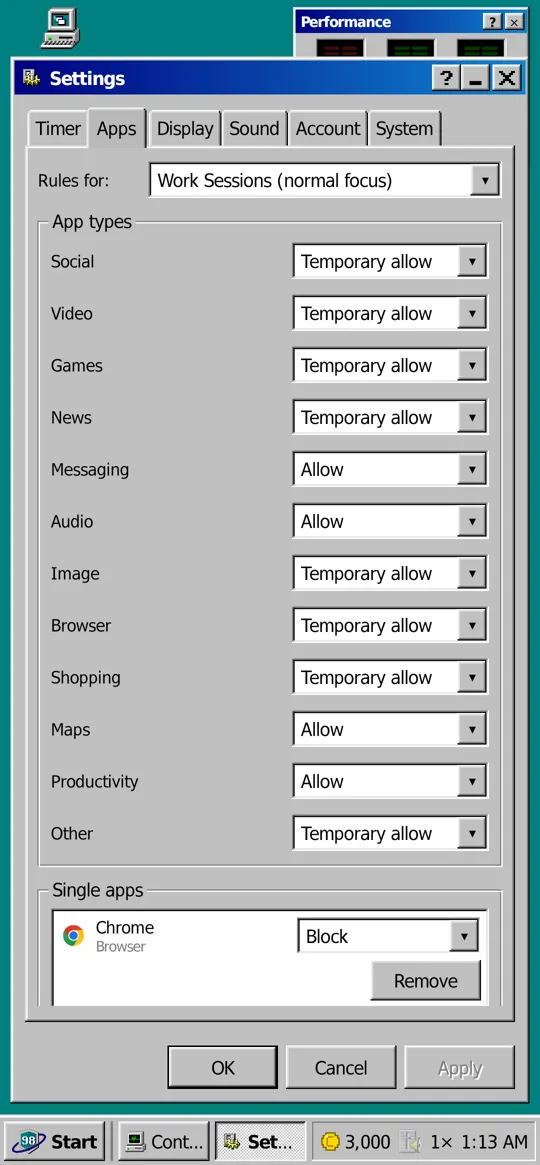
You choose a rule for each kind of app (social, video, games, news, messaging, browsers, shopping and more) and for single apps:
- Allow: fine during a session.
- Temporary allow: fine for a minute, then it asks again.
- Block: Focus98's block screen comes up instead of the app.
There are separate rules for Work Sessions and for Disk Check and Defrag. The rules apply only while something is running. Pause a session and your phone is yours again: pausing never counts against you.
Why it's harder to ignore
Most blockers are easy to tap past, and after a week the novelty is gone. In Focus98, time in distracting apps wears your PC down, so it gets slower until you look after it with Disk Check and Defrag. It never costs you credits and never "dies": it just lags. Meanwhile, focused time keeps paying for upgrades and new eras, so there's always something to work toward.
To block apps on Android with Focus98
- Open Settings, then the Apps tab.
- Pick a rule for each app type, and add single apps you want to treat differently.
- Give Focus98 usage access when it asks, so it can see which app is open.
- Start a Work Session. The rules apply until it ends or you pause it.
Other ways to cut down
Android's own Digital Wellbeing can show your screen time and set daily app timers, which is useful for limits that apply all day. Focus98 is for the times you sit down to work: it blocks only then, and rewards you for staying.
Note Focus98 sees only which app is in front, on your phone. That never leaves your phone.
Questions and answers
How do I block apps on Android?
Android's own Digital Wellbeing can set daily app timers. To block apps only while you work, use a focus app such as Focus98: set the rules in Settings, Apps, and they apply during a Work Session.
Can I block social media only while studying?
Yes. The rules only apply while a session, Disk Check or Defrag runs, and there are separate rules for each.
Can I get around it?
You can pause, and that's on purpose: emergencies happen. Pausing first never counts against you. Leaving without pausing gives you a short countdown to come back.
Does it need special permissions?
Usage access, to see which app is open, and permission to show its block screen over other apps.
Sources
- Ward et al. (2017), Brain Drain: the mere presence of one's own smartphone reduces available cognitive capacity
- Digital Wellbeing, Android Help
More guides
- Pomodoro timer
- A Forest alternative
- Body doubling with friends
- Study timer
- Digital minimalism
- Defrag, the game
- A 90s desktop on your phone
See also: all features
Guide 2 App blocker for AndroidFocus98 User's Guide