 Feature 2 - Crashes, viruses and repairs
Blue screens, viruses and disk errors, as a game
By the Focus98 team · Updated
Old computers needed looking after, and so does this one. Neglect it and you get disk errors, glitches and, eventually, a blue screen. Looking after it is focus time.
Optimization
Your PC's condition is its optimization, from 0 to 100 percent: green when it runs well, yellow when it's slowing down, red when it's in trouble. It falls slowly when you stay away (a day costs about half), a little with each Work Session, and faster while you're in distracting apps. Nights cost a quarter as much, so sleep is cheap.
Disk errors and glitches
Below 50 percent, disk warnings start to appear on the desktop; below 30, drive errors come more often, and when it's very low the screen flashes and glitches now and then. Each message suggests a repair: Disk Check or Disk Defragmenter.
The blue screen
At 0 percent the computer crashes to a blue screen with a fatal exception, just as you remember. Pick a repair, let it finish, and the PC comes back. Until it does, it runs in safe mode with only the repair tools. A crash during a session ends it, but you keep the credits you'd earned.
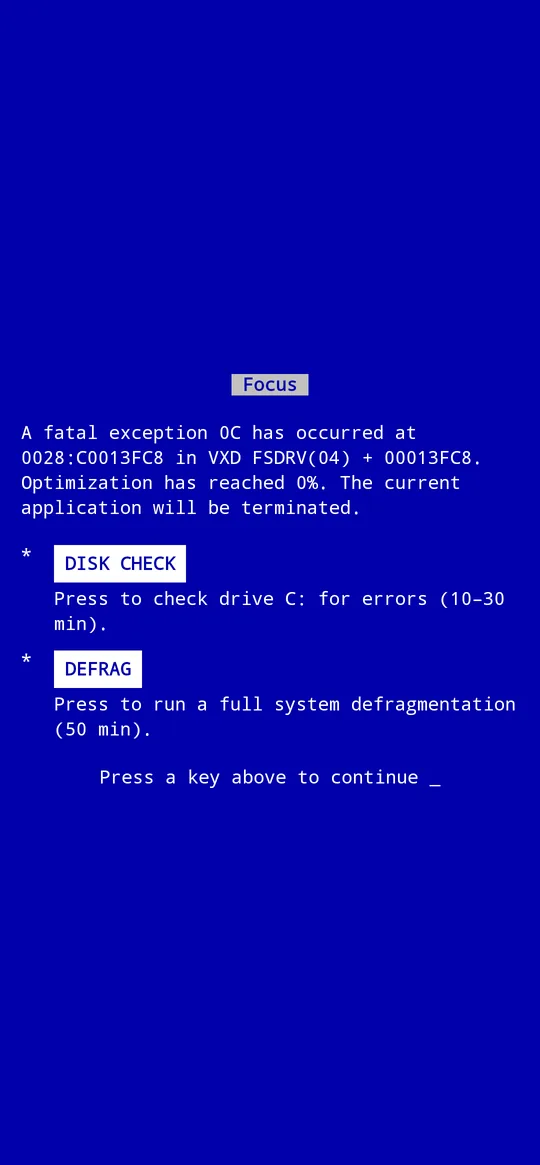
Repairs are focus time
Disk Check and Defrag only run while you stay with them, and they block the apps you choose, with their own, stricter rules. They pay no credits, but they bring the PC back, and a fast PC earns more.
Viruses and spyware
From Chroma 2005 on, the internet bites back. About every five to seven days a virus or spyware gets in. A virus restarts your computer (nothing is lost, and it never interrupts a repair); spyware hijacks the web browser, sending you to other sites every 15 seconds or so. Run a scan with the security programs to remove them, and keep them away with a firewall and a pop-up blocker.
Two tricks worth knowing
- Restart: the first restart of each day holds optimization at 100 percent for half an hour, with no disk errors.
- Log off: going away for the weekend? Log off and optimization doesn't fall while you're gone.
Questions and answers
Do I lose credits when the PC crashes?
No. Getting distracted or crashing never takes credits away. A crash ends the session you were in, and you keep what it had earned.
Can I turn the glitches off?
Yes: Settings, Display.
Are the viruses real?
No, they're part of the game, inside the app. They never touch your phone.

More features
- A retro PC to build up
- The old internet
- FocusChat messenger
- Focus music and soundscapes
- Tasks, streaks and stats
- Wallpapers and screensavers
See also: all guides
Feature 2 Crashes, viruses and repairsFocus98 User's Guide